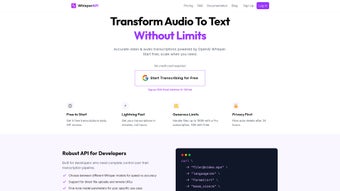

Download WhisperAPI – Secure, Fast Audio‑to‑Text Transcription Tool
Overview
WhisperAPI is a developer‑focused transcription service that harnesses the power of OpenAI’s Whisper model to turn any audio or video file into accurate, searchable text. Whether you’re building a podcast indexing platform, a customer‑support analytics pipeline, or a simple no‑code transcription dashboard, WhisperAPI delivers flexibility, speed, and data‑privacy in a single API package. The service supports a broad spectrum of media formats—MP3, WAV, MP4, MOV, and more—while recognizing dozens of languages with high fidelity.
A free starter tier lets you test the engine without commitment, and tiered subscriptions scale seamlessly for high‑volume enterprises. By automatically deleting uploaded files after 24 hours, WhisperAPI assures confidentiality for sensitive recordings, making it a trustworthy choice for businesses that value security as much as speed. In addition to raw transcription, the platform provides timestamped output, speaker‑diarization flags, and confidence scoring, enabling developers to create rich, interactive experiences such as searchable video libraries, real‑time captioning, and AI‑driven content summarisation.
The API is built on a globally distributed cloud infrastructure, which means low latency responses for users across North America, Europe, and Asia‑Pacific. For teams that need to comply with GDPR, CCPA, or HIPAA, WhisperAPI offers optional audit logs and custom data‑retention policies, reinforcing its position as a compliance‑ready transcription solution. Overall, WhisperAPI combines the cutting‑edge accuracy of Whisper with a thoughtfully engineered developer experience, making it a compelling option for anyone who needs to convert speech to text at scale.
Key Features and Capabilities
- Model Choice Flexibility: Pick from Whisper’s tiny, base, small, medium, or large models to balance speed versus transcription accuracy. The tiny model processes short clips in seconds, while the large model delivers near‑human quality for complex, multi‑speaker recordings.
- Multi‑Format Support: Accepts over 30 audio and video codecs, including MP3, AAC, WAV, FLAC, MP4, AVI, WebM, and even less common containers like OGG and AIFF, ensuring you never need to convert files before uploading.
- Language Coverage: Native recognition for more than 30 major languages and dialects, with automatic language detection that reduces setup time for multilingual projects and supports code‑switching within the same file.
- Parameter Tuning: Adjust temperature, beam size, and word‑timestamp options to tailor output for subtitles, searchable transcripts, or verbatim capture, giving you fine‑grained control over the balance between creativity and precision.
- No‑Code Dashboard: A web‑based interface lets non‑technical users upload files via drag‑and‑drop or paste remote URLs for instant transcription, complete with preview mode and one‑click export to TXT, SRT, VTT, or JSON formats.
- Secure Data Handling: Files are stored encrypted (AES‑256) and automatically purged after 24 hours, complying with GDPR, CCPA, and ISO‑27001 standards, while transit data is protected by TLS 1.3.
- Scalable Pricing: Free starter plan includes 30 minutes of transcription per month; paid tiers unlock higher limits, priority processing, dedicated support, and the ability to negotiate enterprise contracts with volume discounts.
- Real‑Time Webhooks: Receive transcription results via HTTP callbacks, enabling seamless integration into CI pipelines, content‑management systems, or custom notification services without polling.
- Extensive Documentation: Swagger‑compatible OpenAPI specs, code snippets for Python, Node.js, Java, Go, and Ruby, plus sample projects on GitHub that demonstrate batch processing, streaming, and error‑handling best practices.
- Usage Analytics: Dashboard analytics show processing time, word count, cost per request, and model‑specific performance metrics, helping you optimise budgets and forecast future expenses.
Installation, Integration & Usage Guide
Getting started with WhisperAPI is straightforward, whether you prefer a command‑line approach, a full‑stack SDK, or the visual no‑code dashboard. The following steps walk you through account creation, environment setup, making your first transcription request, and leveraging advanced features such as webhooks and usage monitoring.
1. Sign‑Up & Obtain an API Key
Visit the WhisperAPI website, create a free account, and navigate to the API Keys section. After confirming your email, click “Generate New Key”. Copy the generated key; you’ll need it in the Authorization header for every request. For added security, you can restrict the key to specific IP ranges or enable rotating secrets directly from the console.
2. Choose Your Preferred Environment
The API is platform‑agnostic—any system that can make HTTPS calls (Windows, macOS, Linux, Android, iOS) works. For server‑side integration, install the official SDKs:
pip install whisperapi(Python) – includes helper functions for multipart uploads and automatic retry logic.npm install @whisperapi/client(Node.js) – supports streaming uploads and integrates nicely with Express or Next.js back‑ends.- Download the Java JAR from Maven Central – ideal for Android apps or enterprise Java services.
- For .NET developers, a NuGet package
WhisperApi.SDKis available, offering async methods and strong‑typed response models.
3. Basic Transcription Request (cURL Example)
curl -X POST https://api.whisperapi.com/v1/transcribe \
  -H "Authorization: Bearer YOUR_API_KEY" \
  -F "file=@/path/to/audio.mp3" \
  -F "model=medium" \
  -F "language=en" \
  -F "timestamps=true"
This call returns a JSON payload containing the full transcript, per‑word timestamps, confidence scores, and an optional speaker‑diarization block if you enable it. Errors are reported with standard HTTP status codes and a detailed error.message field to simplify debugging.
4. Using the No‑Code Dashboard
Log in to the WhisperAPI portal, click New Transcription, drag your file or paste a public URL, select the desired model, and hit Start. Results appear within minutes and can be downloaded as plain text, SRT, VTT, or JSON files. The UI also offers a “Live Preview” mode that highlights each word as it is recognized, which is useful for real‑time captioning demos.
5. Handling Webhooks
Register a webhook URL in your account settings. WhisperAPI will POST the completed transcript to this endpoint, including a verification signature you can validate using your secret key. This mechanism allows you to automatically store transcripts in a database, trigger downstream NLP pipelines, or push notifications to Slack or Microsoft Teams.
6. Managing Usage & Billing
The dashboard provides a live usage meter that updates in real time. If you approach your plan limit, you can upgrade instantly, enable “soft limit” notifications, or set up automatic top‑up via a saved credit card. Detailed invoices are available for export in CSV or PDF format, simplifying expense tracking for finance teams.
Overall, WhisperAPI’s clear documentation, ready‑made SDKs, and intuitive UI reduce integration time from days to hours, letting you focus on building value‑adding features rather than wrestling with audio processing.
Pros & Cons, Frequently Asked Questions & Final Verdict
Pros
- High accuracy across many languages thanks to OpenAI Whisper.
- Flexible model selection balances cost and speed for any workload.
- Robust security with 24‑hour file deletion, encryption at rest, and TLS 1.3 in transit.
- Comprehensive SDKs and API docs for quick integration across Python, Node.js, Java, .NET, and Go.
- Free starter tier enables risk‑free testing and rapid prototyping.
- Real‑time webhook callbacks streamline automated workflows.
- Detailed usage analytics help optimise budgets and forecast expenses.
- GDPR, CCPA, and ISO‑27001 compliance for enterprise peace of mind.
Cons
- Large models require more compute, leading to higher latency on the free plan.
- No on‑premise deployment; all processing is cloud‑based, which may be a concern for ultra‑sensitive data.
- Advanced tuning parameters may be overwhelming for absolute beginners without prior API experience.
- File size limit of 500 MB requires splitting very long recordings before upload.
- Support response times for free tier users are longer than for paid enterprise customers.
FAQ
How secure is my uploaded audio?
Files are encrypted in transit (TLS) and at rest (AES‑256). WhisperAPI automatically deletes every file after 24 hours, ensuring no lingering copies remain on the server. Optional audit logs let you verify deletion timestamps.
Can I use WhisperAPI on mobile apps?
Yes. The API works with any platform that can send HTTPS requests, including iOS (Swift) and Android (Kotlin/Java). Use the REST endpoints directly or the lightweight JavaScript SDK for React Native to embed transcription capabilities in mobile experiences.
What is the pricing model after the free tier?
WhisperAPI charges per minute of processed audio. Prices vary by model size: the “tiny” model costs $0.003 /min, the “base” model $0.006 /min, the “small” model $0.009 /min, the “medium” model $0.012 /min, and the “large” model $0.018 /min. Volume discounts and annual contracts are available for enterprise customers.
Do I need to specify the language of the recording?
Language detection is automatic, but you can improve accuracy by explicitly setting the language parameter, especially for short clips, noisy environments, or recordings that contain multiple dialects.
Is there a limit on file size?
The API accepts files up to 500 MB. Larger media should be split into chunks before uploading to stay within the limit and to reduce latency. The SDKs provide helper utilities for chunking and parallel submission.
Final Verdict & Call to Action
WhisperAPI delivers a compelling blend of accuracy, flexibility, and security that few transcription services match. Its tiered pricing and generous free tier make it accessible to hobbyists, while the enterprise‑grade features—such as webhook callbacks, detailed analytics, and GDPR‑compliant data handling—appeal to large organizations. If you need a reliable, cloud‑native solution for converting audio or video into searchable text, WhisperAPI is a smart investment. Download WhisperAPI today, start with the free plan, and experience seamless transcription in minutes.



.png)



